Agent Onboarding Resources
Your Journey From Application To Active Agent
Joining a new real estate brand can feel overwhelming, so we’ve created a structured onboarding journey to guide you through every step.
This page explains what happens after your documents have been submitted, how your FFC process works, when your Leapfrog email address will be created, and how to access the platforms, training, and resources you need to get started.
The onboarding process is designed to help you move from candidate to active Leapfrog agent as quickly and smoothly as possible.
Step-by-Step Onboarding Process
Step 1: Submit Your Required Documents
Before your onboarding can begin, your office or franchise team will request the required joining documents.
These may include:
Completed agent information form
Copy of ID document
Contact details
Banking details, where applicable
Proof of qualifications, where applicable
PPRA / FFC information, if already registered
Any office-specific onboarding documentation
Once your documents have been submitted, the internal onboarding process can begin.
Step 2: Your Details Are Added To The Leapfrog Network
Once your documents are received, your details will be captured internally so that the relevant teams can begin setting up your access.
This may include:
Creating or confirming your agent profile
Adding your information to internal systems
Preparing your Leapfrog email address
Giving you access to the correct office resources
Starting your onboarding and training journey
Please ensure that your full name, cellphone number, and email address are correct, as these details are used across multiple systems.
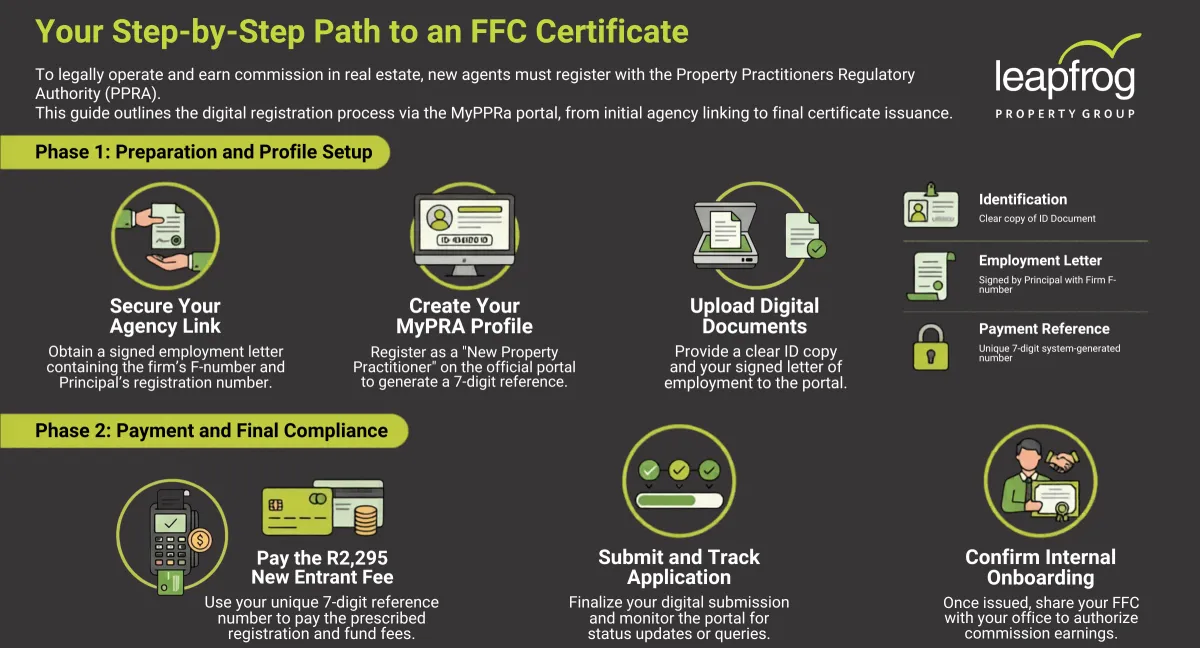
Step 3: FFC Registration / PPRA Process
Registering For Your FFC
If you are joining as a property practitioner, you must be correctly registered with the PPRA and hold a valid Fidelity Fund Certificate, also known as an FFC, before operating as a compliant agent.
If you are still a candidate property practitioner, your office will guide you on the registration process and what information is required.
Important:
You may not operate as a property practitioner or earn commission unless your PPRA / FFC status is compliant.
What you may need to complete:
Create or access your PPRA profile
Submit the required personal and business information
Upload the required supporting documents
Ensure payment of the applicable PPRA fees
Track your FFC application status
Provide proof of your FFC once issued
Your office or team leader will guide you through the specific requirements that apply to your role and registration status.
Your Leapfrog Email Address
As part of your onboarding, you may receive a Leapfrog email address linked to your office or role.
Your Leapfrog email address is important because it has to be used for:
- Leapfrog Community access
- CRM access
- Launchpad access
- Internal communication
- Training invitations
- Brand and system-related updates
Please use your Leapfrog email address wherever possible when registering for Leapfrog platforms.
This helps us keep your access organised and linked to the correct office.
Your email will always be [email protected]
Tip: Once your Leapfrog email address has been created, save the login details securely and use Google Chrome as your main browser for daily Leapfrog platform access.
Register For The Leapfrog Community
The Leapfrog Community is one of the first platforms you should join.
This is where you will find:
- Training content
- Announcements
- CRM support
- Learning videos
- Community discussions
- Events and updates
- Agent resources
- Important internal communication
Once you have access, go to the Learning tab and start with the course:
Getting To Know Your Leapfrog Tech Stack
This course will help you understand the key systems you will use, including where to find the Leapfrog Launchpad and how to access the main tools available to agents.
Access The Leapfrog Launchpad
The Leapfrog Launchpad is your central daily access point for Leapfrog systems and resources.
Once you have access, you can visit: www.leapfrog.co.za
-> Then click: Agent Login in the top-right corner.
From the Launchpad, you will be able to navigate to key platforms and resources such as:
- CRM
- Brand Resources
- Knowledge Base
- Leapfrog Community
- Training material
- Quick Links
- Agent tools
The Launchpad should become your daily starting point.
CRM Access And Training
The Leapfrog CRM is used to manage contacts, leads, pipelines, communication, follow-ups, and sales or rental opportunities.
Before requesting CRM support, please make sure you have completed the first basic steps:
Log into the CRM at twice
Watch the CRM training videos in the Leapfrog Community
Review the CRM Manual in the Launchpad Knowledge Base
Post questions in the CRM Questions channel if you get stuck
When asking for CRM help, please include screenshots and explain what you were trying to do.
This allows the support team to assist faster and more accurately.
Listing Platform Access
You will also be given access to the listing platform used to load and manage property listings, namely Fusion.
This platform will be used for:
- Loading property listings
- Updating property information
- Managing listing photos
- Publishing to property portals
- Keeping listing data accurate
Important: Always make sure your listings are accurate, complete, and compliant before publishing.
Access Brand Resources
Leapfrog agents have access to brand resources to help maintain a consistent and professional market presence.
This may include:
- Logo files
- Brand guidelines
- Marketing templates
- Social media assets
- Presentation material
- Campaign artwork
- Office-approved marketing content
These resources can be accessed through the Leapfrog Launchpad under Brand Resources.
Please use official Leapfrog brand material only. Consistent branding protects the credibility of the national network.
Complete Your Initial Learning
New agents should complete the available onboarding and system training before requesting additional support.
Start with:
1. Getting To Know Your Leapfrog Tech Stack
2. CRM Basics
3. Launchpad overview
4. Community overview
The goal is not to learn everything in one day. The goal is to know where to go when you need help.
Monthly training sessions will commence on our Elevator sessions focused on the CRM.